




Today, no matter what problem or desire you have, you can count on someone saying, “There’s an app for that.” And that’s true for staying connected with your Chevy, thanks to the myChevrolet app. Chevy recently made major improvements to its myChevrolet app based on user feedback. These improvements have resulted in a more user-friendly interface with more intuitive features, tools, and assistance that real drivers have requested. If you live in the Moore, Texas region, we at North Park Chevrolet would be proud if you considered us your local Moore Chevy dealer and paid us a visit so we could show you how Chevy vehicles are leading the pack in innovation with the myChevrolet app.
Your car is one of your most precious possessions, and we love that this app helps you stay up to date on valuable information pertaining to the health of your vehicle. This one little app can help you protect one of your biggest investments. It also has some features that are just a ton of fun to play with. Below, you can take a brief look at all of the surprising things you can do with the app.
Compatibility
First off, note that the myChevrolet app is compatible with Android 9 and up, and all iPhones with iOS 13.0 or later. It’s also available for Apple Watch, so if you don’t feel like carrying around your smartphone, you can access most of this handy app’s features right on your wrist—the same place you take calls and check the time. Just log into your Chevrolet or OnStar account to get the app set up for your car. As for vehicle compatibility, the myChevrolet app works on all capable 2015 GM models or newer. Be sure to ask us if the car you’re interested in works with this great app.
Remote Commands
Using your myChevrolet app, you can remotely lock, unlock and even start the ignition on your vehicle. On those nights you have to park several blocks from your destination and can’t remember whether or not you locked the car; you can get peace of mind knowing that you can simply do so right from your phone. This is also a huge benefit when you lose your key. You can still start the car ignition, even without your key, so long as you have the app, which can provide a temporary replacement until you get a new key. And if a friend wants to retrieve something from your car but you’re not comfortable handing them the keys, just unlock it using your app. It’s that simple.

Keep Up With Important Info
In addition to letting you lock, unlock and start your car remotely, the app also allows you to check important vehicle data from wherever you are. This means you can look into fuel levels or battery life, and plan accordingly. If you find yourself sitting in the office, unsure if you have to leave early to get gas for your next destination, simply open up your app and take a look. And if you do have an electric vehicle but aren’t sure if it’s charged up enough for your next ride, the app can show you that information, too.
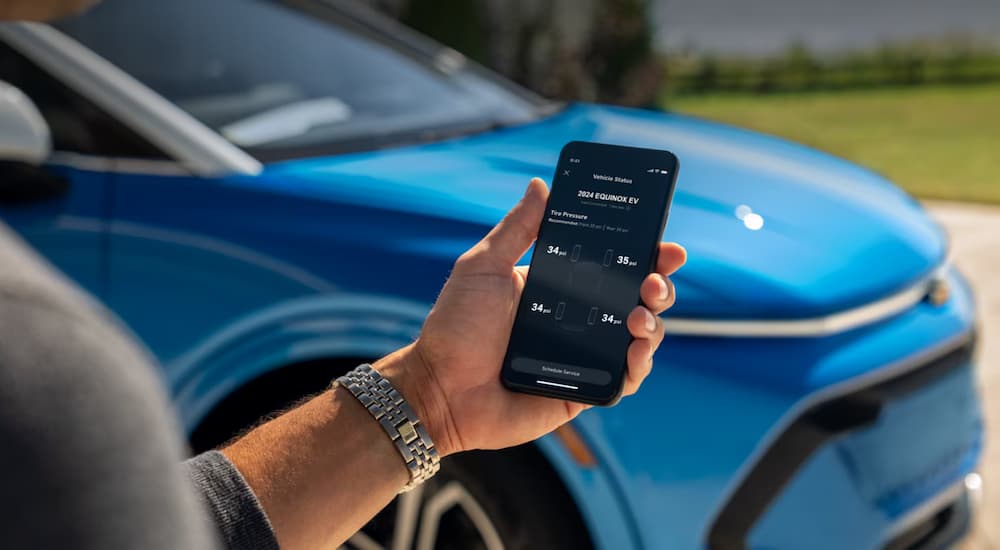
The app will also show you when it’s time to get an oil change and lets you see your tire pressure. Being aware of these numbers can help prevent mishaps on the road and let you get ahead of any issues. The app also lets you select your preferred service schedule and reminds you when to go in for servicing. Plus, it will let you know of any recalls on your vehicle so you can quickly bring it to your local dealer to address critical replacements and repairs.
Locate Your Vehicle
Hopefully, your vehicle never gets stolen. But if it does, the myChevrolet app connects to a tracker on your vehicle and shows you your car’s location in real-time. This can help you swiftly track your car down if it goes missing. All crime aside, it’s also handy when you simply don’t remember when you parked your car. If you visit any of the massive parks around the Moore area, it’s easy to lose track of your car after a long day of hiking (or even simply after a long day of shopping at the cute boutiques in town).
Member Benefits
Don’t forget to enroll in the Chevrolet Rewards Program, through which you can earn points to use towards things like future services, accessories, and even the purchase of a new car. The app conveniently tracks your rewards, so you know when you’ve accumulated enough to add that cool new phone holster or those comfy carpeted floor mats. And when you’re ready to get your next vehicle, apply your rewards for a real cash discount.
Learn About Your Driving Habits
If you’re open to feedback about your driving habits, the Smart Driver feature on the myChevrolet app is a big perk. It collects data about your driving behaviors and gives you tips on how to improve. If you’ve faced down a few tickets in recent years and would like to put an end to that, let the Smart Driver feature gently direct you on how to be the best driver you can be. This app might also help you save money with your insurance provider, as many offer discounts for good driving habits.

Family Sharing
If multiple family members drive your vehicle, they can all use the myChevrolet app on their respective phones to access all of these features. The app allows for up to eight family members to be added to each vehicle. You can also manage your Wi-Fi hotspot data plan on the app—so if you notice you need to increase your plan for your family, that’s easily done on your smartphone.
Trailering
If you like to make use of the wide-open roads around the Moore region to hitch an RV or camper to your vehicle and enjoy some time outdoors, there are many great Chevrolets, like the Silverado 1500 or 2500, to do that with. And what’s more, is that the myChevrolet app can help you do so safely. The app lets you run a trailer test, activating the trailer brake lights and turn signals to ensure those are working. Furthermore, its trailer load calculator helps you get an exact weight for your vehicle and towed load combined, so you know exactly what you’re working with. Remember that towing more than your car can handle can result in hefty fines, or worse, an accident, so always use this feature before trailering anything with your Chevy.
If You Have an Electric Vehicle…
You might have heard that GM plans to go all electric by 2035, so it’s no surprise that their myChevrolet app has some features for electric vehicles. If you do have an EV, you’ll appreciate that the app shows you where the nearest charging stations are in your area. It also gives you an update on the range of your vehicle and helps you find routes that stay within your range. We suspect that’s only the beginning of the EV-friendly features on this app. Chevrolet is constantly improving the myChevrolet app to reflect drivers’ habits and preferences. Be sure to check in with your favorite app store to see when there’s a new version available.
Connect with us


- July 2026
- June 2026
- May 2026
- April 2026
- March 2026
- February 2026
- January 2026
- December 2025
- November 2025
- October 2025
- September 2025
- August 2025
- July 2025
- June 2025
- May 2025
- April 2025
- March 2025
- February 2025
- January 2025
- December 2024
- November 2024
- October 2024
- September 2024
- August 2024
- July 2024
- June 2024
- May 2024
- April 2024
- March 2024
- February 2024
- January 2024
- December 2023
- November 2023
- October 2023
- September 2023
- August 2023
- July 2023
- June 2023
- May 2023
- April 2023
- March 2023
- February 2023
- January 2023
- December 2022
- November 2022
- October 2022
- September 2022
- August 2022
- July 2022
- June 2022
- May 2022
- April 2022
- March 2022
- February 2022
- January 2022
- December 2021
Archives
- 2024 Chevy Blazer
- 2024 Chevy Equinox EV
- 2024 Chevy Suburban
- 2024 Silverado EV vs 2024 Ford F-150 Lightning
- 2025 Chevy Blazer
- 2025 Chevy Blazer EV
- 2025 Chevy Colorado
- 2025 Chevy Colorado vs 2025 Ford Ranger
- 2025 Chevy Equinox
- 2025 Chevy Equinox EV
- 2025 Chevy Silverado 1500
- 2025 Chevy Silverado 2500 HD
- 2025 Chevy Silverado 3500 HD
- 2025 Chevy Suburban
- 2025 Chevy Tahoe
- 2025 Chevy Trailblazer
- 2025 Chevy Traverse
- 2025 Chevy Traverse vs 2025 GMC Acadia
- 2025 Chevy Trax
- 2026 Chevy Colorado
- 2026 Chevy Colorado vs 2026 GMC Canyon
- 2026 Chevy Equinox
- 2026 Chevy Silverado 1500
- 2026 Chevy Silverado 1500 vs 2026 GMC Sierra 1500
- 2026 Chevy Silverado 1500 vs 2026 Ram 1500
- 2026 Chevy Silverado 2500 HD
- 2026 Chevy Tahoe
- 2026 Chevy Trax
- 2027 Chevy Bolt
- 2027 Chevy Silverado 1500
- Bigfoot Chevy Dealership
- Blazer EV for Sale
- Blazer EV for Sale Near San Antonio
- Boerne Chevy Dealer
- Braun's Farm Chevy Dealership
- Budget Cars for Sale
- Castroville Chevy Dealership
- Certified Pre-Owned Chevy Dealer
- Chevrolet Camaro Dealer
- Chevrolet Dealership San Antonio
- Chevy Blazer for Sale
- Chevy Bolt for Sale
- Chevy Colorado for Sale
- Chevy Colorado for Sale In Castroville
- Chevy Colorado for Sale Near Helotes
- Chevy Colorado for Sale Near Hondo
- Chevy Colorado for Sale Near Lakehills
- Chevy Colorado for Sale Near San Antonio
- Chevy Dealer
- Chevy Dealer Near Converse
- Chevy Dealer Near Lakehills
- Chevy Dealer Near Me
- Chevy Dealer Near Pearsall
- Chevy Dealer Near San Antonio
- Chevy Dealer Serving Uvalde
- Chevy Equinox EV Dealer
- Chevy Equinox EV for Sale
- Chevy Equinox EV for Sale Near Castroville
- Chevy Equinox EV for Sale Near San Antonio
- Chevy Equinox for Sale
- Chevy Equinox for Sale Near San Antonio
- Chevy Equinox for Sale Near Uvalde
- Chevy EV Dealer
- Chevy Fleet Vehicles for Sale
- Chevy Malibu for Sale
- Chevy Silverado 1500 Dealer
- Chevy Silverado 1500 for Sale
- Chevy Silverado 1500 for Sale in Castroville
- Chevy Silverado 1500 for Sale Near Fair Oaks Ranch
- Chevy Silverado 1500 for Sale Near Helotes
- Chevy Silverado 1500 for Sale Near Hondo
- Chevy Silverado 1500 for Sale Near San Antonio
- Chevy Silverado 1500 for Sale Near Uvalde
- Chevy Silverado 2500 for Sale Near San Antonio
- Chevy Silverado EV for Sale in Castroville
- Chevy Suburban for Sale
- Chevy Suburban for Sale Near San Antonio
- Chevy Suburban for Sale Near Uvalde
- Chevy SUVs for Sale
- Chevy Tahoe for Sale Near Hondo
- Chevy Tahoe for Sale Near Lakehills
- Chevy Tahoe for Sale Near San Antonio
- Chevy Trailblazer for Sale
- Chevy Trailblazer for Sale Near San Antonio
- Chevy Traverse for Sale
- Chevy Traverse for Sale in Castroville
- Chevy Traverse for Sale Near Helotes
- Chevy Traverse for Sale Near Lakehills
- Chevy Traverse for Sale Near Leon Valley
- Chevy Traverse for Sale Near San Antonio
- Chevy Trax for Sale
- Chevy Trax for Sale in Castroville
- Chevy Trax for Sale Near San Antonio
- Chevy Trucks for Sale
- Chevy Trucks for Sale Near Hondo
- Chevy Trucks for Sale Near Lakehills
- Devine Chevy Dealer
- Electric Vehicles for Sale
- GM Purchase Programs
- Helotes Chevy Dealer
- Hondo Chevrolet Dealer
- Hondo Chevy Dealer
- Leon Valley Chevy Dealership
- Moore Chevy Dealer
- Oak Grove Chevrolet Dealer
- Oil Change
- Oil Change Near Me
- San Antonio Chevrolet Dealer
- San Antonio Chevy Commercial Truck Dealer
- San Antonio Chevy Dealer
- San Antonio Chevy Suburban Dealer
- San Antonio Used Car Dealerships
- San Antonio Used Chevy Dealer
- Sell My Car
- Silverado 2500 for Sale
- Silverado EV for Sale
- Silverado EV for Sale Near San Antonio
- SUVs for Sale
- SUVs for Sale in Castroville
- SUVs for Sale in San Antonio
- SUVs for Sale Near Hondo
- Tahoe for Sale
- Texas Chevy Dealer
- Truck Dealer Near Me
- Trucks for Sale
- Used Car Dealer Near Me
- Used Cars for Sale
- Used Chevy Dealer
- Used Chevy Silverado for Sale
- Used Chevy Silverado for Sale Near San Antonio
- Used Chevy Trucks Near Me
- Used SUVs for Sale
- Used Truck Dealer Near San Antonio
- Used Truck Dealership
- Used Trucks for Sale
- Used Trucks for Sale in Castroville, TX
- Used Trucks for Sale Near San Antonio
- Work Trucks for Sale